TDS organizes delegation and real-time task tracking for managers
Assign tasks with deadlines, priority tags, and a Do Now/Schedule/Delegate/Eliminate matrix while staff update status and comments in real time. TDS - Task Delegate System, from Task Delegate System, is an Android business-productivity app built to centralize delegation and activity records. Key capabilities include role-based access, automated deadline reminders, and per-task audit trails. It fits managers and team leads who need clear ownership, visible progress, and fewer manual follow-ups.
It defines task ownership and permissions clearly
Clarity of ownership is the app's central claim: role-based access and team management permissions assign who can create, edit, or view tasks. The presence of activity logs and audit trails for every task enforces accountability by keeping a historical record of changes and comments. For managers responsible for handoffs, that audit trail records assignment timestamps and status changes, reducing uncertainty about who did what and when.
It supports a priority-driven delegation workflow
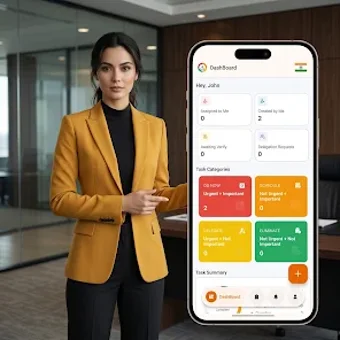
The app embeds a Do Now, Schedule, Delegate, Eliminate priority matrix and lets managers attach priority levels and detailed instructions to assignments. Task statuses such as Pending, In-Progress, Completed, and Overdue give a compact view of progress from assignment to completion. That workflow suits teams that need a repeatable delegation pattern and visual cues for outstanding work.
Dashboard and onboarding focus on fast navigation
The dashboard is modern and designed for fast navigation, offering managers quick access to active tasks and overdue items. Role separation reduces menu clutter by exposing only relevant controls to each user type. The matrix and permission model add conceptual steps, so teams unfamiliar with priority frameworks should expect a short onboarding phase to adopt the routing conventions.
Mobile-first collaboration and notification behavior
As an Android app, TDS depends on push notifications and automated reminders to keep field staff and office teams aligned. That notification model supports immediate updates and deadline alerts, and the real-time status tracking keeps the task feed current. File import/export and cross-platform desktop sync are not described, so collaboration assumes an Android-centric workflow within teams that share mobile access.
Best for managers who need structured mobile delegation
TDS suits managers and team leads who require a disciplined, mobile-first tool for assigning work and keeping an auditable history. It favors organizations ready to adopt a priority matrix and mobile notifications as core coordination channels. Teams needing desktop-native clients or a minimal personal to-do list may find the Android focus and structured workflow a poor fit.